DESCRIPTION
| Operation Mode | Push Button |
| Current Rating | 2 Amps |
| Operating Voltage | 5 Volts (DC) |
| Contact Type | 常开 |
| Connector Type | Usb 2.0 |
| Brand | CKLau |
| Terminal | Physical |
| Item dimensions L x W x H | 5.12 x 2.95 x 1.65 inches |
| Circuit Type | 2-way |
| Mounting Type | Wall Mount |
|
|
About this item
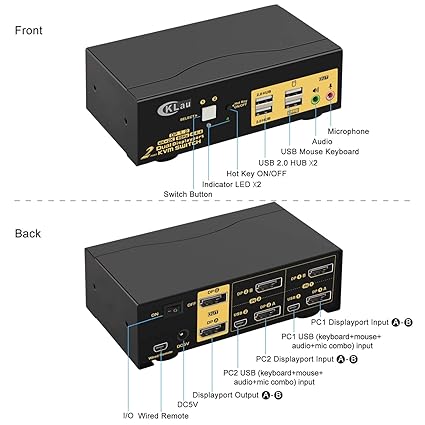
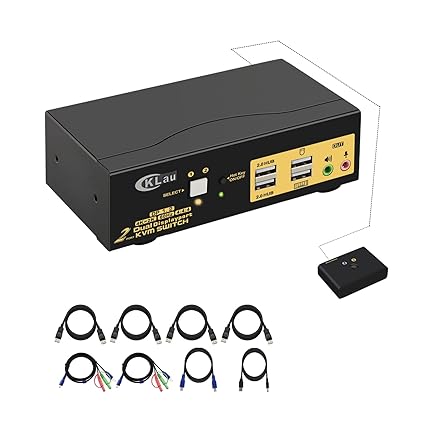
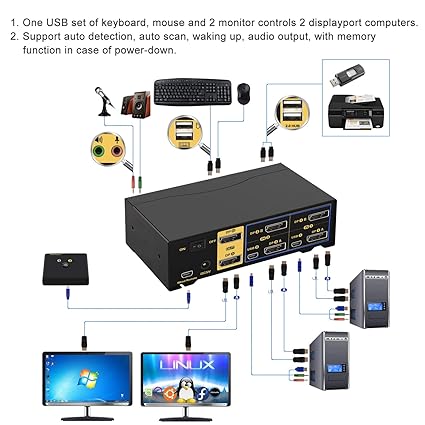
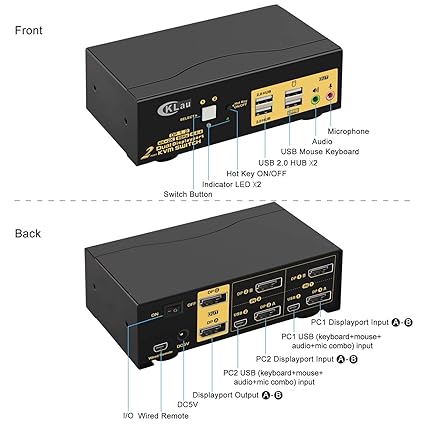
- 1. Displayport KVM Switch Dual Monitor: 2 computers sharing one set of keyboard & mouse, 2 monitors, audio, and 2 pcs USB 2.0 peripheral devices. (Tips: 1. It supports DP 1.2 and DP 1.4 versions at 4K 60Hz refresh rate only. Please set your devices to 4K@60Hz before using them. 2. This KVM switch required each of your computers with 2 video output or multi-video output. 3. This item without EDID simulation.)
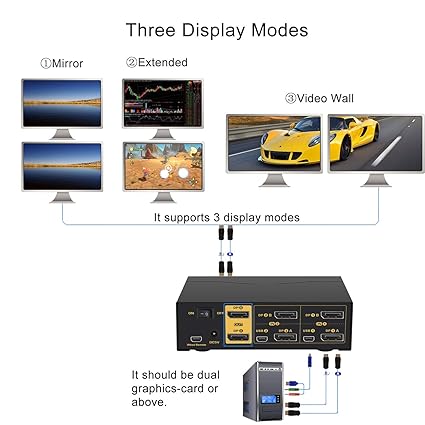
- 2. Dual Monitor KVM Displayport: Four optional switching ways: Hotkey switching(Num Lock + Num Lock + 1 / 2 + Enter, or Ctrl + Ctrl + 1 / 2 + Enter, or Scroll Lock+ Scroll Lock+1 / 2 + Enter), mouse switching (click mouse wheel 2 times), manual button switching, wired remote push button switching. Suport three display modes: extended display, mirror display and splice wall display.
- 3. Displayport KVM Dual Monitor: Support wired/wireless/unify/Bluetooth keyboard/mouse, Apple keyboard (hotkey is changeable), touch screen, OLED screen, 16:9 widescreen, 21:9 ultra-wide monitors, etc. (Bluetooth keyboard/mouse should with a receiver, it doesn’t support built-in Bluetooth keyboard/mouse)
- 4. Displayport KVM Switch 2 Monitors: Max resolution up to 4096×2160@60Hz 4:4:4, compatible 3840×2160@60hz, 3840×1620@60Hz, 3440×1600@60Hz, 3440×1440@60Hz, 3840×1080@240Hz, 3200×1800@60Hz, 2560×1440@60Hz, 2048×1536@60Hz, 2048×1280@60Hz, 2048×1080@60Hz, 1920×1200@60Hz, 1920×1080@60Hz and lower resolution. Drive-free for Windows 11/10/7/2000/XP/Vista, Linux, Mac, Debian, Ubuntu, Fedora, Raspbian, Ubuntu, etc.
- 5. KVM Switch Dual Monitor Displayport: Support auto-detection, waking up, and auto scan mode for monitoring all computers/Macs/laptops. Build-in memory function in case of a power outage. Metal case body with a premium finish, space-saving design with non-slip foot pads. If you meet monitor flicker issue, please contact us on Amazon, and we will send you the Displayport 1.4 cables with magnetic ring, it can solve the issue.
- 6. If only one computer is BIOS-based, start by turning it on, logging in, and waiting for the display. Switch to the second computer and turn it on. If both computers are BIOS-based, start the KVM, then the first BIOS computer, log in, wait for the display, switch the KVM to the second computer, and finally, turn on the second BIOS computer. In short, don’t start both BIOS computers simultaneously to avoid issues like a black screen or disabling your keyboard and mouse.
Categories: Connectors / Converters, SPLITERS / SWITCHES

i8 Pro Max Smart Watch 8 (44mm) (IMPORTED PRODUCT)
USB TO LAN 2.0
Imported Power Cable For Desktop PC Computer 1.5M
CKLau 4K@60Hz 2 Port Dual Monitor KVM Switch Displayport with Audio, USB 2.0 Hub and Cables, DP 1.2 KVM Switch 2 Monitors 2 Computers Support Hotkey Switching (IMPORTED PRODUCT)
Tenda N301 Wireless High Range 300Mbps Broadband N Router
JOYROOM JR-WQN01 15W 3in1 Foldable Wireless Charging Station
Xiaomi Mi 4C Router 300Mbps WIFI Router 5dBi 2.4GHz 802.11a/B/G With Four Antennas
IPHONE USB-C PD 20W Power Adapter Charger 2 pin (USA PIN)
Jmary MK-59 Desktop Mobile Holder With 360° Rotation
HAWK 2.5” HDD Case USB 3.0 & Type C 2-in-1 Connector
M2 to SATA Adapter
HARD DISK HDD 2.5 INCH CASE 2.0
Grefay Bike Phone Mount Motorcycle Phone Holder - Motorcycle Bicycle Cell Phone Mount Clamp for Handlebar, Cycling Motorcycle Accessory Mounts with 360° Rotation for 3.5" - 6.5" inch Smartphone(IMPORTED PRODUCT)
Seagate Expansion Portable Case (Hard Disk Case) 3.0 With Cable For PC & Laptop
Lume Cube LC-BLK Broadcast LED Lighting Kit with Collapsible Tripod 12.5 - 30 in - Warm/Cool Light(IMPORTED PRODUCT)


There are no reviews yet.